



Description
RaceReplay Version 5.0
RaceReplay™ is an easy to use application for capturing and playback of video from a video camera. You can use RaceReplay for controlling instant video replays of captured video. The video can be displayed over a projection system or large TV so your audience can enjoy the instant replays and live action video. You can even capture, save and print snapshots from the video playback, preview or even during recording. RaceReplay is also easily customized.
RaceReplay is very flexible and has been used for:
- Cub Scout® Pinewood Derby®, Awana® Grand Prix and other similar races
- Instant replays of football and hockey games
- Instant replays of bull riding events
- Checking fastball pitching technique
- Brides-to-be trying on wedding dresses in a boutique
- Capturing video from various video sources and saving to the computer
- Capturing snapshots from video files or from the video feed
If you know of any other good uses for RaceReplay, let us know.
Key Features:
- Preview and Capture Live Video - Use the provided controls to view live video from your video camera and record the video to your computer. Video is recorded in AVI file format.
- Play Video Clips - You can easily open, play and pause previously recorded video clips. Plays AVI, MPG, MPEG, and WMV video files.
- Instant Replay - As soon as recording is complete, the video will be automatically replayed on screen (with the optional auto replay mode turned on) or you can manually start the replay sequence yourself.
- Customize the Replay Sequence - You can switch the auto replay mode on and off. Control the number of replays, how much of the video to replay, add a delay before the start of replay or stop of recording, and even display the replays in full screen. After replay, you can opt to have RaceReplay return to live preview, minimize the screen or do nothing.
- Playback Speed - Adjust the playback speed up or down, like for slow motion replays, or even step the video forward one frame at a time.
- Video Size - Adjust the video size up or down or display the video in full screen mode.
- Remote Recording and Replay - RaceReplay can be used as a standalone application or in tandem with other software.
- GrandPrix Race Manager Version 6.0 and above can automatically control when to start recording (clicking on the "Ready Timer" button) and when to stop (results received from the timing system). RaceReplay can then start the instant replay sequence automatically or you can do it yourself manually.
- With GrandPrix Race Manager, file names for the video clips will have the name of the race group, the round number and heat number (e.g. Wolves_Round1_Heat1.avi) so you can easily go back and replay a clip for a specific heat.
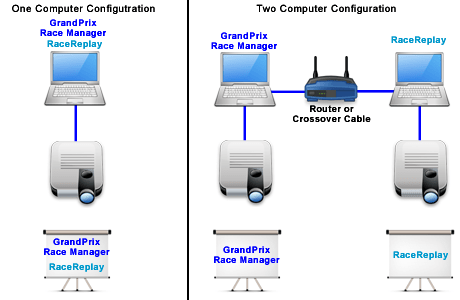
- RaceReplay and GrandPrix Race Manager can be run on the same computer or on two different networked computers (requires GrandPrix Race Manager Version 9.0 or above).
- Dual Monitors - When running Windows in extended monitor mode, RaceReplay gives you the ability to control the video from one monitor while the video itself is displayed on a secondary monitor. The audience will only see the video, not you working the controls.
- Take Snapshots - While the video is playing, you can grab a snapshot to capture a specific moment, like a spectacular crash or a close finish. Snapshots can be saved and even printed. Previously saved snapshots can also be viewed and printed.
- Manage File Storage Space - Since video files can take up a lot of hard drive space you are given some options to manage how much storage will be used for your video clips. You can record over the last video clip, save the last specified number of files, or limit the storage space to a certain amount.
- Easily Adjust Volume/Balance - Easily mute/unmute playback audio and you have easy access to your PC's sound and balance controls for fine volume adjustment.
A portion of the profits from this software are donated to our local Awana missionaries. Awana® is an international organization which seeks to teach girls and boys about the Gospel of Christ and to train them to serve Him through bible verse memorization, bible teaching, games, and other activities.
RaceReplay is a trademark of Lisano Enterprises, LLC.
Awana is a registered trademark of Awana Clubs International.
i-Link is a registered trademark of Sony Corporation.
Cub Scouts and Pinewood Derby are registered trademarks of the Boy Scouts of America.
Windows and Internet Explorer are registered trademarks of Microsoft Corporation in the United States and/or other countries.
What's New
| Upgrade Policy: | Upgrade Now |
Registered users of Versions 4 and above of this software are eligible to purchase the upgrade.
Anyone purchasing an earlier version of this software within 90 days of the newest version being released can contact us for a free upgrade.
What's New with Version 5.0:
Version 5.0 of RaceReplay adds several new features and improvements to make video recording and replay easier and more flexible.
- Remote Interface
- Added the ability to receive UDP multicast messages from GrandPrix Race Manager. This allows GrandPrix Race Manager to send messages simultaneously to both RaceFX and RaceReplay.
- Advanced Software Settings
- Allow users multiple setting files they can switch between. Updated existing Export settings to allow for file naming.
- Advanced Video Settings
- Added support for configuring the video Color Space/Compression, Video Size and Frame Rate.
- General
- Added support for the use of a presentation remote to control various software functions. Each remote button can be configured in the Advanced Software Settings screen to control a particular function.
- Modified the file cleanup to run on a background thread, so not to bog down the main program.
- Several other less notable improvements and fixes were implemented.
Screenshots
Screenshots:
To view the RaceReplay screen shots, click on the images below to enlarge.
 |
 |
| Main Screen | Snapshot Viewer Screen |
 |
|
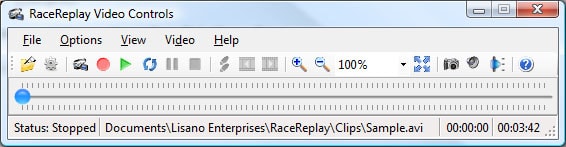
| Video Controls Screen (Optional) | |
 |
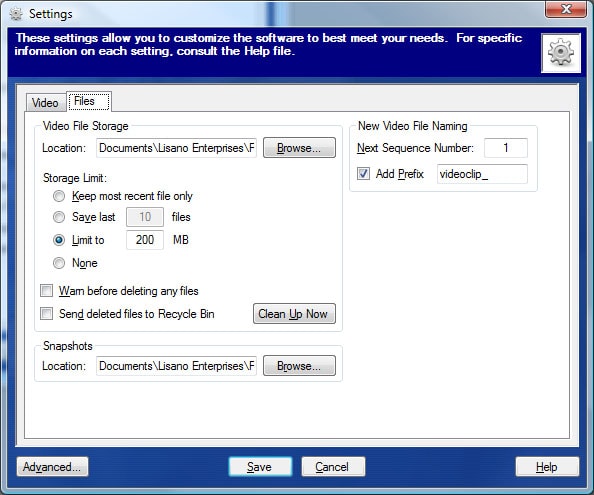 |
| Video Settings | File Settings |
 |
|
| Configurations | |
Videos
RaceReplay Videos:
Sample Video - Sample heat video.
Interface to GrandPrix Race Manager - How to interface RaceReplay and GrandPrix Race Manager to automatically record and do a video replay of each heat.
Requirements
Minimum Software Requirements:
- Video Camera or Webcam
- Connection between Video Camera and Computer
- CPU speed of 2.0 GHz or faster
- 32 or 64 bit versions of Windows® 7, 8/8.1, 10, or 11
- Internet Explorer® 5.01 or above
- Microsoft .NET Framework 3.5 SP1
- 17 MB of hard drive space
- 256 MB of RAM (512 MB recommended)
Prerequisites:
For Windows 7 Users:
- The Microsoft .NET Framework 3.5 SP1 needs to be turned on in order to run this software. It comes pre-installed with Windows 7 but is not turned on by default. Refer to these instructions on how to turn that feature on.
For Windows 8, 8.1 and 10 Users:
- The Microsoft .NET Framework 3.5 SP1 needs to be turned on in order to run this software. It comes pre-installed with Windows 8/8.1 and 10 but is not turned on by default. Refer to these instructions on how to turn that feature on.
Connecting Video Camera to Computer - There are many possible ways to connect your video camera to the computer. Of course, it really depends on what connections are available on the computer and the video camera. We highly recommend that you download the software and test it out with your video camera before purchasing a license.
- FireWire: Also known as IEEE-1394, i-Link® or DV and provides high quality digital video but can lead to to very large file sizes for the video clips.
- HDMI: Provides high quality digital video and audio but can lead to to very large file sizes for the video clips. Your video camera must be able to output live video via the HDMI port. Some do not. Your computer's HDMI port must be able to act as a video input. Most computers will only output video through their HDMI port, not take it as an input. You may be able to use a HDMI capture card or capture device, if needed to connect between the camera and the computer.
- Composite Video: Provides good quality analog video. You usually need to use a video capture device or capture card to connect between the video camera and the computer.
- S-Video: Provides good quality analog video. You usually need to use a video capture device or capture card to connect between the video camera and the computer.
- USB: You can use a USB webcam or connect your video camera to your computer via a USB video capture device. USB Capture Devices generally provide Composite and S-Video connections for your video camera. USB webcams do limit where you can place your computer, due to their short cable length.
Video Capture Device or Capture Card Minimum Recommended Capabilities:
- Minimum 30 frames per second
- Minimum 640 X 480 resolution (without any software enhancement)
- USB 2.0
- Must be Microsoft DirectShow compatible
Webcam Minimum Recommended Capabilities:
- 1.3 Megapixels or higher
- Progressive scan